
Examples
When developing functions, you will often encounter common patterns and use cases. This page provides practical examples demonstrating how to solve these problems while adhering to Best Practices, such as efficient secret management, parallel execution, and proper error handling.
OAuth 1.0a
LivePerson Functions supports the OAuth 1.0a authorization flow using the oauth-1.0a package. This is useful for integrating with external services that require signed requests.
The following example demonstrates how to perform a POST request with a generated Authorization header.
Best Practice: Store sensitive credentials like consumerKey and tokenSecret in the Secret Storage rather than hardcoding them in your source code.
import { Toolbelt } from 'core-functions-toolbelt';
import OAuth from 'oauth-1.0a';
import crypto from 'crypto';

// Best Practice: Initialize clients outside the function handler (Global Scope).
// This allows them to be reused across invocations, leveraging internal caching.
const secretClient = Toolbelt.SecretClient();

async function lambda(input) {
  try {
    // Best Practice: Parallelize independent asynchronous calls to reduce execution time.
    // Instead of awaiting each secret sequentially, we fetch them concurrently.
    const [consumerKey, consumerSecret, tokenKey, tokenSecret] = await Promise.all([
      secretClient.readSecret('consumerKey'),
      secretClient.readSecret('consumerSecret'),
      secretClient.readSecret('tokenKey'), // Optional for some requests
      secretClient.readSecret('tokenSecret') // Optional for some requests
    ]);

    const oauth = OAuth({
      consumer: { key: consumerKey.value, secret: consumerSecret.value },
      signature_method: 'HMAC-SHA1',
      hash_function(base_string, key) {
        return crypto.createHmac('sha1', key).update(base_string).digest('base64');
      },
    });

    const requestData = {
      url: 'https://www.mywebsite.com/request',
      method: 'POST',
      body: { key: 'value' },
    };

    // Generate the Authorization header
    const authorization = oauth.toHeader(
      oauth.authorize(requestData, { key: tokenKey.value, secret: tokenSecret.value })
    );

    const response = await fetch(requestData.url, {
      method: requestData.method,
      headers: {
        ...authorization,
        'Content-Type': 'application/json',
      },
      body: JSON.stringify(requestData.body),
    });

    if (!response.ok) {
        throw new Error(`Request failed with status ${response.status}`);
    }

    return await response.json();
  } catch (error) {
    // Best Practice: Implement robust error handling and structured logging.
    console.error('OAuth 1.0a request failed', { error: error.message });
    throw error;
  }
}
OAuth 2.0
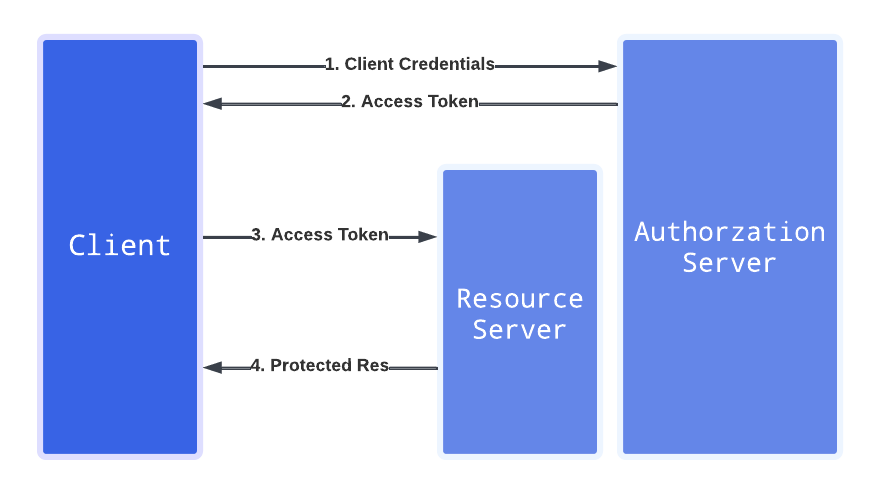
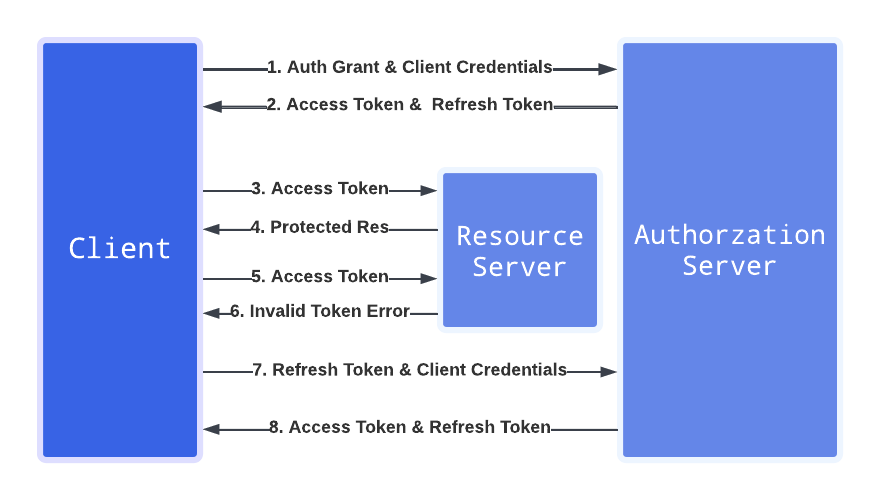
OAuth 2.0 is a widely used authorization framework. LivePerson Functions supports standard flows like Client Credentials and Refresh Token.
Client Credentials Flow
Use this flow when the application needs to access resources on its own behalf.
import { Toolbelt } from 'core-functions-toolbelt';

// Best Practice: Initialize the SecretClient globally.
const secretClient = Toolbelt.SecretClient();

async function lambda(input) {
  const authUrl = 'https://www.mywebsite.com/auth';
  const resourceUrl = 'https://www.mywebsite.com/request';

  try {
    // Best Practice: Fetch secrets in parallel to improve performance.
    const [clientId, clientSecret] = await Promise.all([
        secretClient.readSecret('clientId'),
        secretClient.readSecret('clientSecret')
    ]);

    // Obtain the access token
    const tokenResponse = await fetch(authUrl, {
        method: 'POST',
        headers: { 'Content-Type': 'application/x-www-form-urlencoded' },
        body: new URLSearchParams({
            client_id: clientId.value,
            client_secret: clientSecret.value,
            grant_type: 'client_credentials'
        })
    });

    if (!tokenResponse.ok) {
        throw new Error(`Failed to obtain token: ${tokenResponse.statusText}`);
    }

    const { access_token } = await tokenResponse.json();

    // Access the protected resource using the token
    const response = await fetch(resourceUrl, {
      method: "GET",
      headers: {
        'Authorization': `Bearer ${access_token}`,
      }
    });

    return await response.json();
  } catch (error) {
    console.error('OAuth 2.0 Client Credentials flow failed', { error: error.message });
    throw error;
  }
}
Refresh Token Flow
Use this flow to obtain a new access token when the current one expires. It is recommended to use a Scheduled Function to periodically refresh tokens and update them in the Secret Storage.
import { Toolbelt } from 'core-functions-toolbelt';

const secretClient = Toolbelt.SecretClient();

async function lambda(input) {
  const authUrl = 'https://www.mywebsite.com/auth';

  try {
      // Best Practice: Parallelize secret fetching.
      const [clientId, clientSecret, refreshToken] = await Promise.all([
          secretClient.readSecret('clientId'),
          secretClient.readSecret('clientSecret'),
          secretClient.readSecret('refreshToken')
      ]);

      const tokenResponse = await fetch(authUrl, {
          method: 'POST',
          headers: { 'Content-Type': 'application/x-www-form-urlencoded' },
          body: new URLSearchParams({
              client_id: clientId.value,
              client_secret: clientSecret.value,
              refresh_token: refreshToken.value,
              grant_type: 'refresh_token'
          })
      });

      if (!tokenResponse.ok) {
         throw new Error(`Failed to refresh token: ${tokenResponse.statusText}`);
      }

      const tokenData = await tokenResponse.json();

      // Best Practice: Parallelize writing secrets back to storage.
      await Promise.all([
          secretClient.writeSecret({ key: 'accessToken', value: tokenData.accessToken }),
          secretClient.writeSecret({ key: 'refreshToken', value: tokenData.refreshToken })
      ]);

      return { status: 'Tokens updated successfully' };

  } catch (error) {
      console.error('OAuth 2.0 Refresh Token flow failed', { error: error.message });
      throw error;
  }
}
Secret Storage Caching
The SecretClient caches secrets in memory (default 5 minutes) to improve performance and reduce API calls. This caching strategy is crucial for high-traffic functions.
Note: The cache is instance-local. If your function scales to multiple instances, the cache is not shared between them.
If you require the absolute latest value (e.g., immediately after an update), you can bypass the cache.
import { Toolbelt } from 'core-functions-toolbelt';

// Global initialization enables caching across invocations
const secretClient = Toolbelt.SecretClient();

async function lambda(input) {
    try {
        // Standard read: Returns cached value if available and valid
        const cachedSecret = await secretClient.readSecret("YOUR_SECRET");

        // Bypass cache: Forces a fetch from the backend
        // Use sparingly to avoid performance degradation.
        const freshSecret = await secretClient.readSecret("YOUR_SECRET", { useCache: false });

        return 'Success';
    } catch (error) {
        throw error;
    }
}
Estimated Wait Time Calculation
This example demonstrates a more complex workflow where we:
- Check if agents are available for a specific skill.
- If available, fetch the estimated wait time from the Message Queue Health API.
- Inform the customer via a system message if the wait is too long.
This example leverages several Best Practices, including global client initialization, environment variables for configuration, and structured logging.
import { Toolbelt, LpServices } from 'core-functions-toolbelt';

// Best Practice: Initialize LpClient globally to reuse the authentication token.
const lpClient = Toolbelt.LpClient();

// Helper to fetch wait time stats
const getMaximumWaitTime = async (skillId) => {
    // Best Practice: Use Environment Variables (process.env) for configuration like Brand ID.
    const accountId = process.env.X_LIVEPERSON_BRAND_ID;

    const response = await lpClient(
        LpServices.LE_DATA_REPORTING,
        `/operations/api/account/${accountId}/msgqueuehealth/current/?skillIds=${skillId}&v=1`,
        { method: 'GET', appKeySecretName: 'API_KEYS' }
    );

    if (!response.ok) return false;

    const data = await response.json();
    const metrics = data?.skillsMetrics?.[skillId];

    if (metrics) {
        // Convert milliseconds to minutes and round up
        return Math.ceil(metrics.waitTimeForAgentAssignment_90thPercentile / 60000);
    }
    return false;
};

// Helper to check agent status
const isAgentAvailable = async (skillId) => {
    const accountId = process.env.X_LIVEPERSON_BRAND_ID;

    const response = await lpClient(
        LpServices.MSG_HIST,
        `/messaging_history/api/account/${accountId}/agent-view/status`,
        {
            method: 'POST',
            headers: { 'Content-Type': 'application/json' },
            appKeySecretName: 'API_KEYS',
            body: JSON.stringify({ skillIds: [skillId] })
        }
    );

    if (!response.ok) return false;

    const data = await response.json();

    // Check if any agent in the list is 'ONLINE'
    return data.agentStatusRecords?.some(agent => agent.currentStatus === 'ONLINE');
};

async function lambda(input) {
    // Extract newSkillId from the Conversation Routing payload
    const { routing: { newSkillId } } = input.payload;

    try {
        // Step 1: Check availability
        const available = await isAgentAvailable(newSkillId);

        if (!available) {
            return [{ type: 'systemMessage', text: "We will get back to you as soon as possible." }];
        }

        // Step 2: Get wait time
        const waitTime = await getMaximumWaitTime(newSkillId);

        // Best Practice: Use Environment Variables for business logic thresholds (e.g., 'THRESHOLD').
        const threshold = parseInt(process.env['THRESHOLD'] || '5', 10);

        if (waitTime !== false && waitTime >= threshold) {
            return [{ type: 'systemMessage', text: `We are currently busy. We'll get back to you in approximately ${waitTime} minutes.` }];
        }

        // Default: If wait time is low or unknown, return nothing to let conversation proceed.
        return [];

    } catch (error) {
        // Best Practice: Use structured logging for errors.
        console.error("Error in Wait Time Logic", {
            error: error.message,
            skillId: newSkillId
        });
        // Gracefully fail by re-throwing or returning a fallback message
        throw error;
    }
}