
Test AI agents, live agents, and conventional bots
You can use Syntrix to test not just non-deterministic AI agents and live agents, but also conventional bots that don’t make use of LLMs.
Live agents may know customers are synthetic
Whether or not your agents are aware that the customers are synthetic depends largely on whether you make this known to your agents. You can choose between transparent collaboration as a part of a training program, or total discretion where agents are audited during standard, daily operations. The former creates a low-stakes environment that's ideal for skill building and practice. The latter allows you to monitor performance and quality assurance.
It is important to note that tech-savvy agents might still identify a synthetic customer through specific metadata or flags visible within their workspace.
Scenarios and personas are distributed across conversations
When running a limited number of conversations (as you do in any simulation), you want maximum variety. Each conversation should explore a combination of scenario and persona that hasn't been used before. Novel combinations give you the most differentiation and the most useful data.
Syntrix ensures this coverage by creating a matrix of every possible scenario/persona pairing at the start of a simulation. For example, if the simulation includes 5 scenarios and 4 personas, the matrix includes 20 unique pairings.
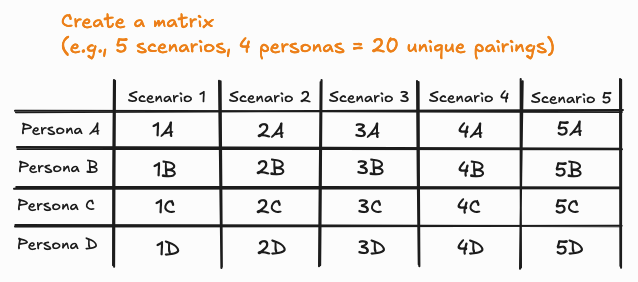
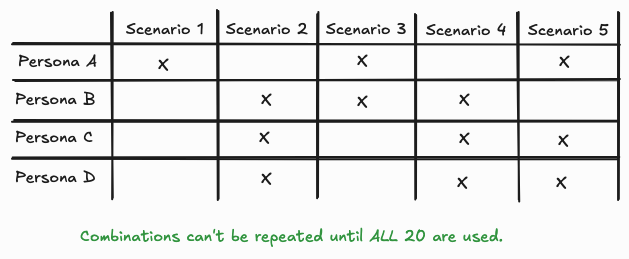
Then, for a conversation, the system randomly selects a pairing from the matrix. Importantly, to maximize coverage, pairings are not repeated until all combinations in the matrix have been exhausted.
Identities are distributed across conversations
Identity distribution depends on the scenario/persona matrix described in the preceding section; review that section first.
You can choose to run a simulation in one of three ways:
- Use predefined identities that you've created, for example, John Smith with email jsmith9915@gmail.com, etc.
- Use random identities generated at runtime; this is useful when an identity is required, but specific details are not a priority.
- Use anonymous synthetic customers, where no identity data is used.
With anonymous customers, identities are excluded from the generation process, and all synthetic customers are represented as "Unknown."
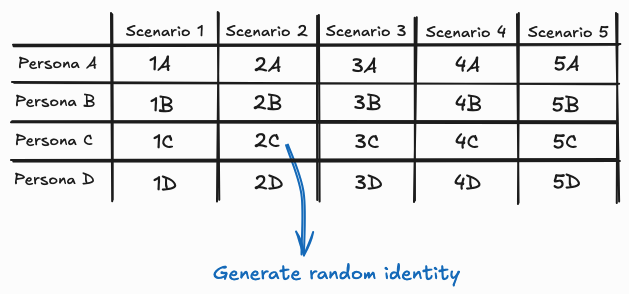
When using random identities, the system selects a scenario/persona pairing and then generates a random identity for it. Together, these three elements comprise the synthetic customer.
When using predefined identities, assignment focuses on "scenario sets." A scenario set is that subset of the matrix that includes a single scenario paired with every available persona.
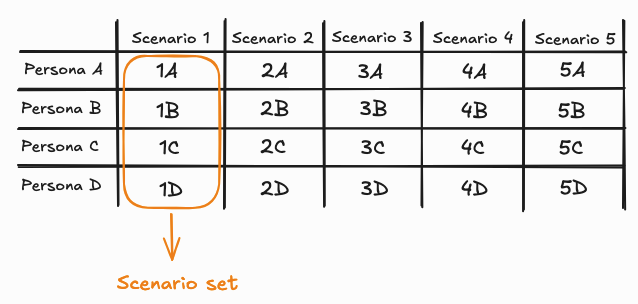
When the scenario in the scenario set is used in a conversation, the system randomly selects one of the identities associated with that specific scenario.
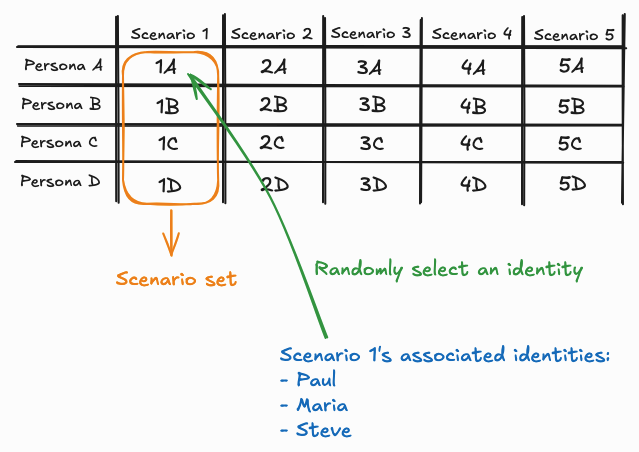
To maximize coverage of identities, an identity can’t be repeated within the scenario set until all identities are exhausted. This facilitates an even distribution of identities for a single scenario, independent of persona, and across a simulation with enough total conversations to exhaust the identity pool.
Note, however, that the system doesn't guarantee that a scenario/persona pairing always uses a different identity. Consider the following example:
- A simulation of 40 total conversations
- The simulation involves 5 scenarios (all using the same 3 identities) and 4 personas
In a simulation of 40 conversations, each of the 20 pairings (5 scenarios x 4 personas) is used twice. However, the identity assigned to those two instances may vary, making any of the following outcomes possible:
- 2 conversations that both use {Scenario 1 + Persona A + Identity I} …Or…
- 2 conversations that both use {Scenario 1 + Persona A + Identity II} …Or…
- 2 conversations that both use {Scenario 1 + Persona A + Identity III} …Or…
- 2 conversations, each using any one of {Scenario 1 + Persona A + Identity I}, {Scenario 1 + Persona A + Identity II}, or {Scenario 1 + Persona A + Identity III}
Predefined identities are synchronized to prevent collisions
You can link predefined identities to scenarios to run realistic simulations, such as mystery shopping, without disrupting operations. Identities provide synthetic customers with fixed, fictitious attributes (names, emails, etc.) that match your CRM or training records.
Collision prevention
To prevent data "collisions"—where multiple agents attempt to access the same CRM record simultaneously—Syntrix ensures each identity is used in only one active conversation at a time.
Concurrency constraints
This "one-at-a-time" rule introduces two key constraints:
- Identity-limited concurrency: The number of available identities acts as a hard cap on active conversations. If a simulation is set to a "Max. concurrent conversations" of 40, but there are only 10 identities that it can use, then no more than 10 conversations can run at once.
- Cross-simulation sharing: When the system ensures that an identity can be used in only one conversation at a time, it does this with a view across all simulations that are in progress. So, if you're running 2 or more simulations at a time that use the same identities, this can further limit the number of concurrent conversations that are possible.
Due to these intentional constraints, simulations using predefined identities may take longer to complete than you expect, or longer than those using randomized or anonymous data.
Success criteria for agents is scenario-specific or universal
Agent performance criteria is defined within two spots in the simulation and training studio:
- Within the scenario
- Within the scorecard
While both are essential for evaluating performance, they serve distinct, yet complementary purposes.
To ensure your evaluation is both specific and comprehensive, it helps to break them down by scope, purpose, and content.
At a glance: The key differences
| Feature | Agent goals in a scenario | Agent goals in a scorecard |
|---|---|---|
| Scope | Specific and local: Applies only to a single, specific scenario. | Generic and global: Applies to every conversation, regardless of the topic. |
| Purpose | Defines the specific outcome and customer requirements for the interaction. | Defines core agent behaviors and universal quality standards: empathy, professionalism, etc. |
| Focus | The "What": Did the agent actually solve the specific problem and in the right way? | The "How": Did the agent follow the broader rules and treat the customer well? |
Examples
Imagine a customer calling to change a flight.
The scenario's agent goals check the business outcome:
- Was the flight date modified to the requested date?
- Is the price difference of the new ticket less than or equal to $100?
- Was the confirmation email sent to the verified address?
In contrast, the scorecard's agent goals check the agent's behavior:
- Did the agent maintain a professional demeanor throughout the interaction?
- Did the agent communicate in a polite and courteous manner?
Keep this distinction in mind when defining agent goals in your scenarios. When you ensure that agent goals are scenario-specific, you target what’s necessary to succeed in that context.
Stay tuned for a future update that will allow scorecard customization, giving you even more flexibility to track agent behavior across all your scenarios.
Transcript review is optional and efficient
Syntrix brings great news here: When evaluating a report, and in specific the simulated customer conversations, you don’t need to read every transcript. The primary deliverable is the AI analysis or summary, which provides quick, actionable insights.
However, for thorough quality assurance or deeper investigation, you can, indeed, review the full transcripts side-by-side with the AI's findings to gain deeper insights.
Synthetic customer assets are reusable
The true power of the synthetic customer assets (scenarios, personas, etc.) lies in their reusability across different training and evaluation needs. For example, a single persona, such as the "Busy parent," can be paired with various scenarios to test multiple customer goals.
Assume for a moment that you’re setting up simulations for Acme Telco, a fictional telecommunications company. You could apply the "Busy parent" persona to the "Report service outage" scenario to evaluate the call center agent's speed and efficiency. The same "Busy parent" persona could be used for the entirely different "Upgrade data plan" scenario to test the sales agent's product knowledge and upselling technique.
This modularity allows you to efficiently test a wide range of customer interactions.
Starter packs accelerate deployment
To get you up and running quickly, Syntrix includes a number of prebuilt profiles, scenarios and personas created by LivePerson for common cases. Take advantage of these. You'll find them front and center in the UI on relevant pages.