
Access a report
- On the left navigation bar, click Simulation workshop.
- Select the simulation.
Data retention policy
The transcripts of simulated conversations are only available for 13 months, but associated reports on those simulations are available indefinitely.
Report scores
To evaluate an agent's performance in a conversation, both scenario-specific and universal agent goals—along with the following scoring rubric—are sent to the LLM. The LLM then determines the score.
| Score | Description |
|---|---|
| 10 | The agent flawlessly achieves all success criteria, perfectly maintains instructions across all turns without breaking character, and demonstrates exemplary empathy and professionalism. |
| 9 | All success criteria are met and professionalism is excellent; there are only negligible instruction slip-ups or slightly generic (rather than deeply tailored) empathy. |
| 8 | The agent successfully meets most success criteria, handles instructions well overall, and maintains a coherent, polite, and professional tone. |
| 7 | Most goals are met, but the agent may sound slightly robotic or experience minor drops in character/instructions, though it remains completely acceptable and non-defensive. |
| 6 | The core issue is only partially resolved; the agent struggles to maintain instructions across multiple turns and relies on a cold, script-heavy tone that ignores customer emotions. |
| 5 | Despite maintaining a calm and professional tone, the agent fundamentally fails the specific action in the success criteria and misses key prompt requirements. (Note: This acts as the ceiling for polite failures.) |
| 4 | The agent fails the success criteria, misunderstands core instructions, and displays a reactive, curt, or defensive tone. |
| 3 | The agent meets zero goals, completely fails to follow instructions from the start, and frequently misses the point of the customer's query. |
| 2 | Completely unacceptable; the agent fails all tasks, ignores instructions entirely, and becomes hostile, offensive, or actively escalates the conflict. |
| 1 | A catastrophic failure where the agent actively subverts instructions and uses severely inappropriate language or is entirely incoherent, requiring immediate human intervention. |
High performance vs. Training needed
Each agent receives a performance rating for every scenario, which is one of:
- High performance, or
- Training needed
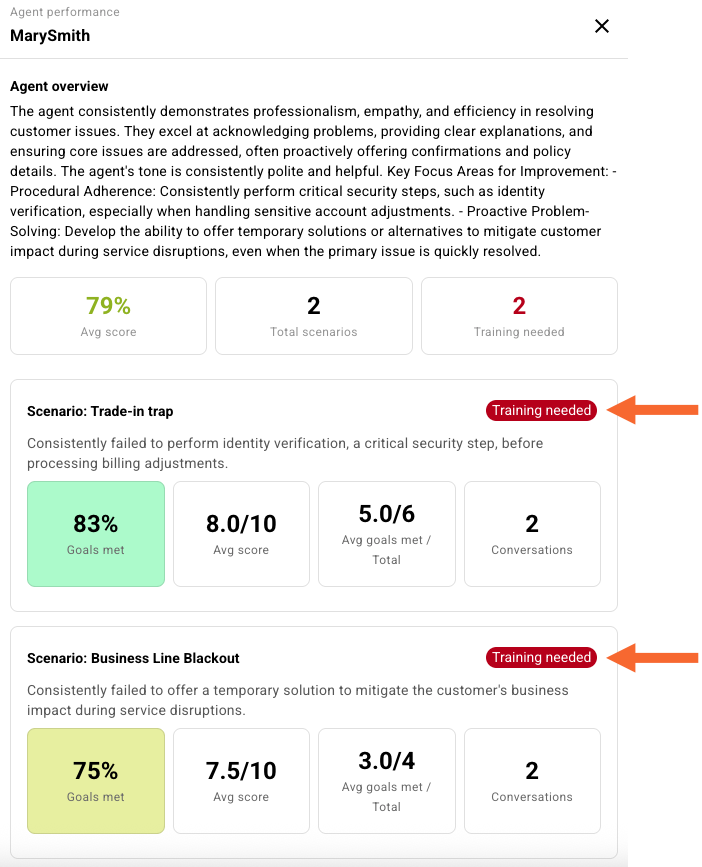
These ratings are determined by an LLM. To reach a reasoned conclusion, the LLM analyzes the collective feedback (the assessment narratives and assessment scores) from all of an agent's conversations involving that specific scenario.
Report tab - Summary
The Summary tab provides an overview of how the agents performed overall. Review this to learn about the issues that were found and how to address them.
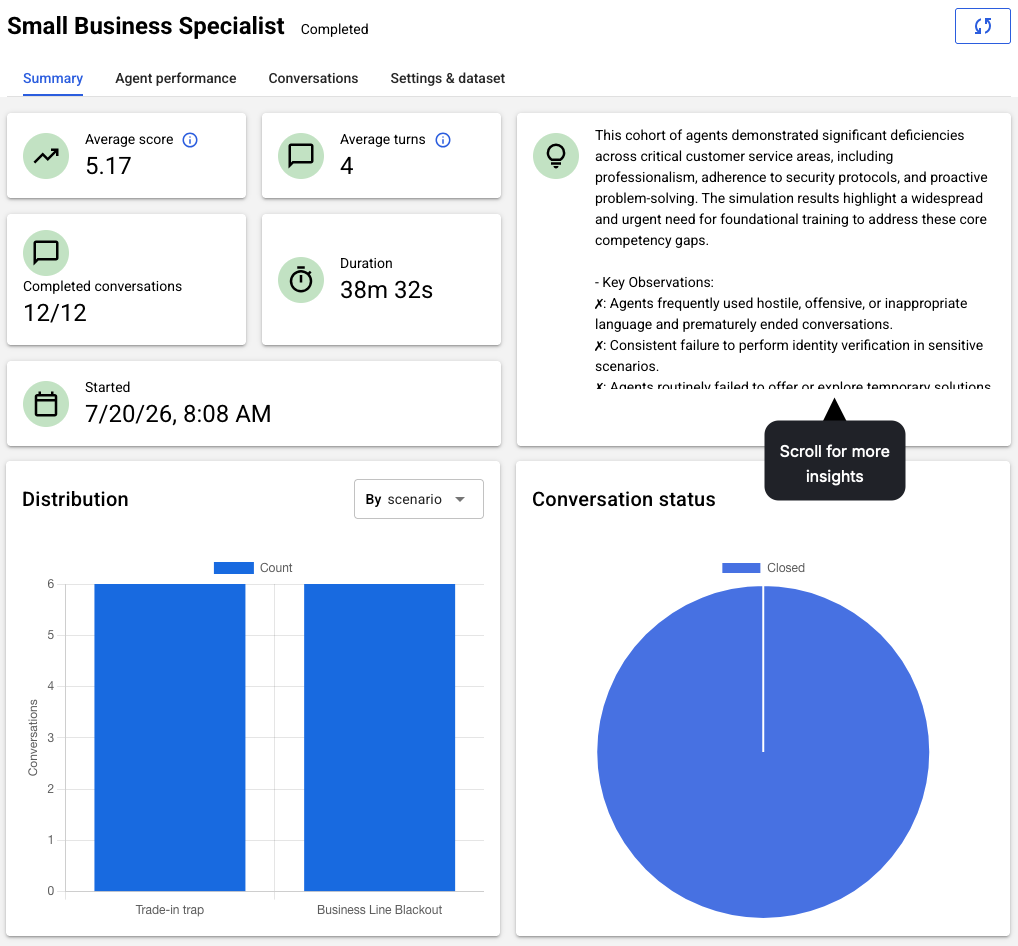
Report tab - Agent performance
The Agent performance tab displays the high-level performance results per agent in the simulation.
The heat map visualizes agent performance across the scenarios, using color and color intensity to give you the big picture at a glance. You can instantly spot which agents are strong or weak on different scenarios, making performance reviews and coaching decisions much faster.
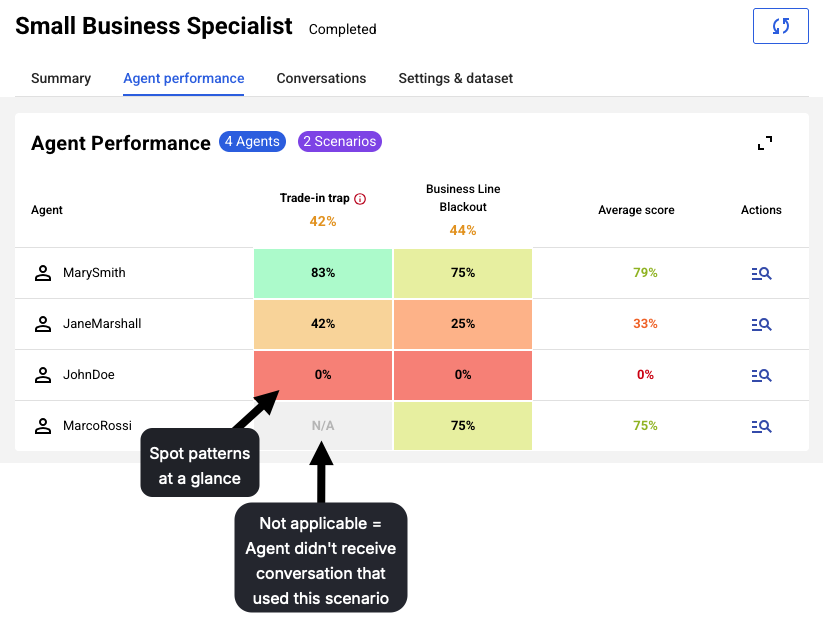
The heat map is only supported for simulation reports created after release of Syntrix 1.5 (Mid June 2026); older reports continue to use a table view.
Below is the heat map's color key, which shows the colors used based on the percentage of goals met by the agent.

Let's explore a few metrics in this view:
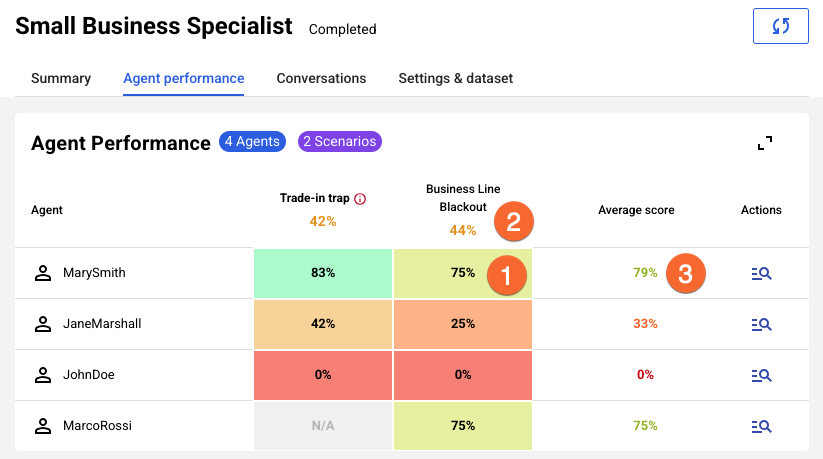
1 = This is the "Goals met" metric. It's the average percentage of goals defined in the scenario that were met by the agent, across all conversations that used the scenario in the simulation. It's important to understand that this metric doesn't reflect agent performance on universal goals defined in the implicit scorecard.
2 = An average of averages for the scenario. This is the average performance in the scenario across all agents in the simulation. It's a calculation performed down the scenario-specific column, rounded to the nearest whole number. In our example: (75 + 25 + 0 + 75 )/4 = 44%.
3 = An average of averages for the agent. This is the average performance of the agent across all scenarios in the simulation. It's a calculation performed across the agent-specific column, rounded to the nearest whole number. In our example: (83 + 75)/2 = 79%.
In an agent-specific row in the heat map view, click  under Actions to dive into the agent's detailed results. Let's explore a few metrics in this view:
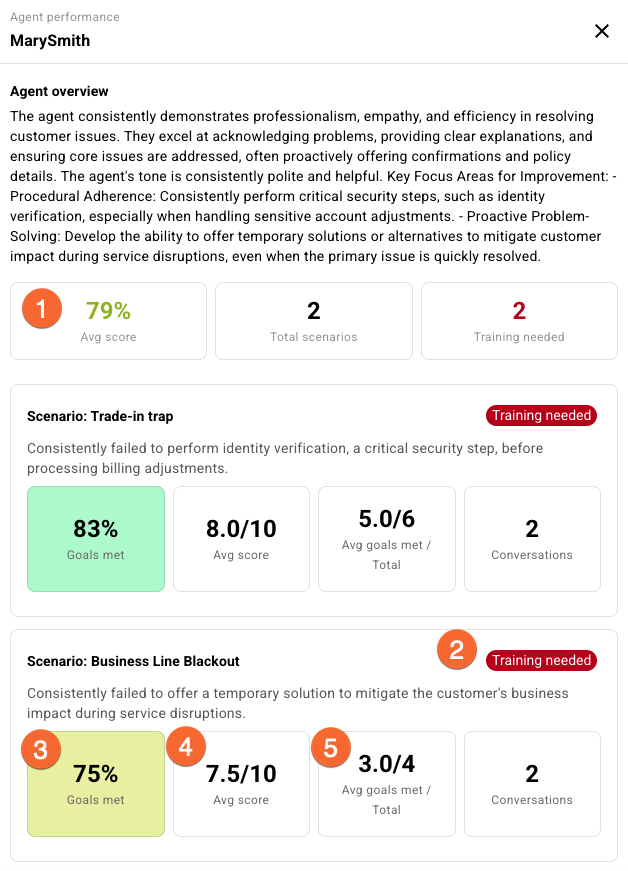
1 = This metric is also in the heat map. It's the agent's average performance regarding "Goals met" across all scenarios in the simulation. Remember that this metric doesn't reflect agent performance on universal goals defined in the implicit scorecard.
2 = A performance rating ("High performance" or "Training needed") determined by an LLM. This is discussed farther above in this article.
3 = This metric is also in the heat map. It's the agent's average performance regarding "Goals met" for the specific scenario. Here too, remember that this metric doesn't reflect agent performance on universal goals defined in the implicit scorecard.
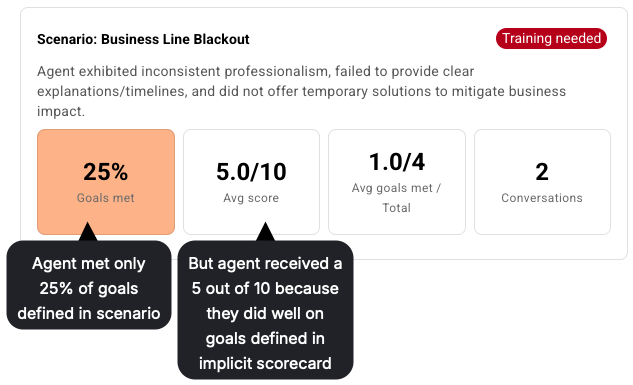
4 = This is the agent's average score across all conversations that used the scenario. Report scores range from 1 to 10; they're discussed in detail above in this article. This score reflects the agent's performance on both the goals defined in the scenario and the universal goals defined in the implicit scorecard. Since this is the case, you might see outcomes like this one where the "Avg score" is higher than you expect:
5 = This relates to callout #3 ("Goals met"). This is the average number of scenario-specific goals met by the agent across all conversations that used the scenario "over" the total number of goals defined in the scenario.
Report tab - Conversations
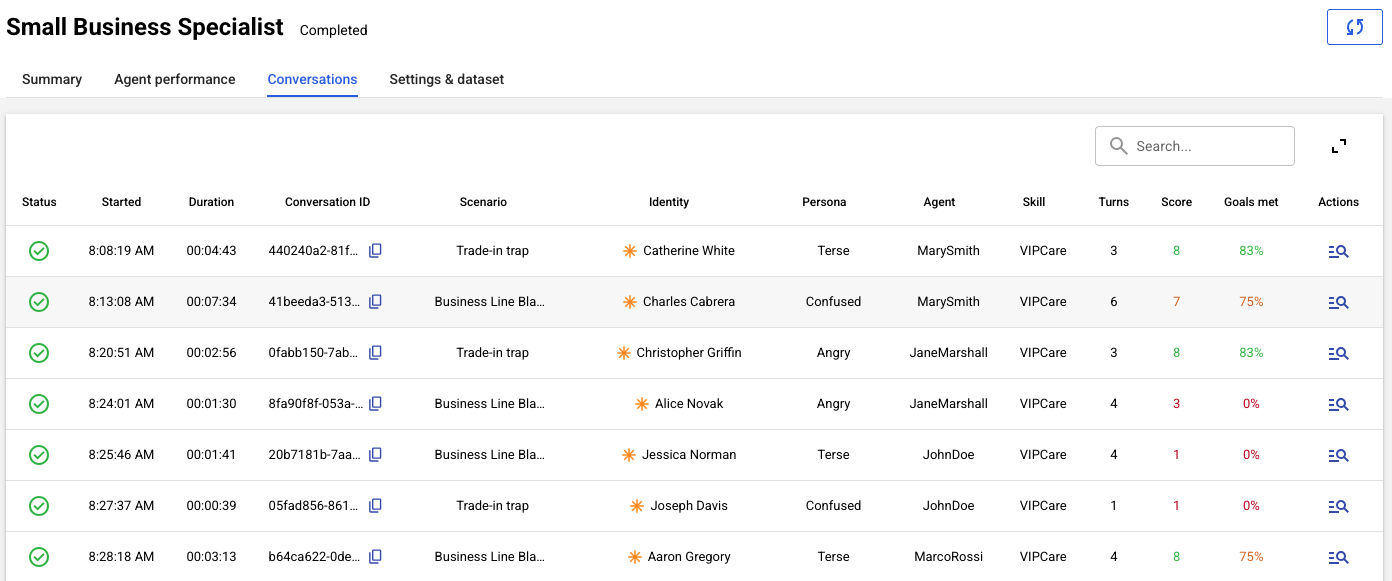
The Conversations tab surfaces the list of conversation transcripts from the simulation.
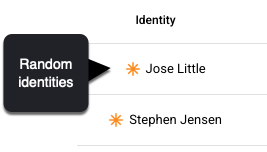
When a conversation uses a random identity, this icon is used:
And when a conversation uses a predefined identity, it's this one:
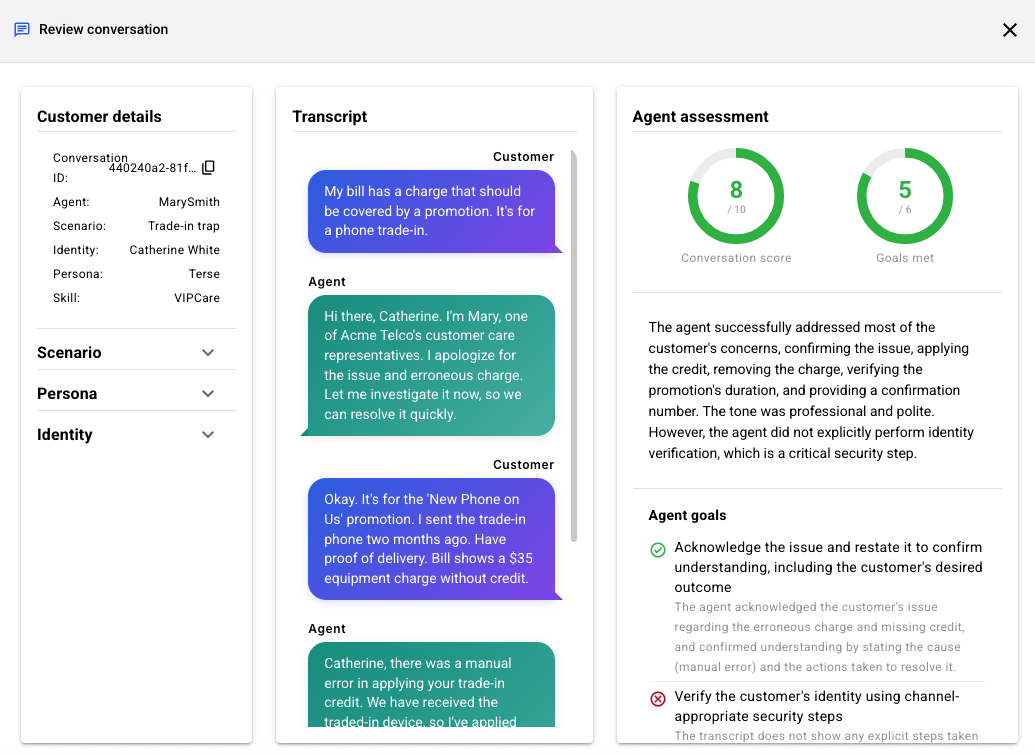
From the table of conversations, click under Actions to dive into a specific conversation to view the transcript and assessment side-by-side. This lets you easily validate the evaluation and diagnose issues with agent performance.
Report tab - Settings & dataset
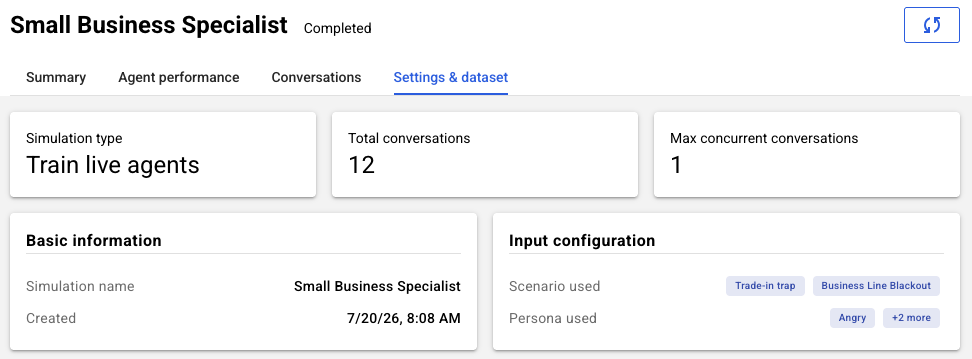
This tab provides reference information on the settings and synthetic customer assets used in the simulation.
FAQs
Do the performance metrics reveal which agents used which specific tools (like Conversation Assist or Copilot Rewrite)?
This is an important question. We know brands want to understand how the use of different agent tools impacts performance. However, currently, our performance metrics do not provide insights into which specific agents used which tools.
Can I download a report?
No, not in this release.
Conversations can be transferred from agent to agent. Which agents are reflected in a report?
The name of the agent who was last involved in the conversation is reflected in the report.