
Introduction
AI agents frequently send rich and structured content instead of plain text—things like multiple-choice menus, quick reply options, buttons, carousels, and images—both to make choices easier to present and select, and to drive stronger engagement than plain text alone. Syntrix currently optimizes for three structured content interaction types:
- Multiple choice
- Quick reply
- Button
Our approach here is deliberately narrow rather than exhaustive: we are telling you what we do support, not asserting that everything else is broken. Interaction types outside this list may work, may partially work, or may not work at all. Review the conversations carefully to ensure the synthetic customer is able to interact with the structured content as expected.
What's supported?
LivePerson Conversation Builder bots
Syntrix supports the following Conversation Builder interaction types that are used in LivePerson bots:
- Multiple choice
- Quick reply
- Button
- Multiple choice, quick reply, and button interactions via the Universal interaction: When these are built to match the standard Conversation Builder interaction types in all material ways, they are supported. That said, if this is the case, it is far quicker and easier to use one of the above ready-made and tailor-made interactions.
Third-party bots
Interactions closely resembling a supported type (see above) will generally work, but this isn't guaranteed. To present the interaction to the synthetic customer, the underlying JSON is simplified into a structure that is understandable and doesn't expose internal information (see "Values versus button text" below). If the JSON diverges too much from the supported type, this simplification may break down, presenting incomplete data to the synthetic customer.
We recommend carefully reviewing transcripts when first testing third-party bot flows that include structured content, to confirm the synthetic customer is engaging as expected.
What's unsupported?
- Images: Syntrix does not interpret or render images.
- Multi-select via the Universal interaction: This does not work in Syntrix.
- Metadata: In a Structured question, you can set metadata in a button’s configuration. Metadata is ignored at this time. The most notable impact of this is that an external ID, which is part of metadata, is not passed back to the bot.
What's uncertain?
All other interaction types—for example, carousels (Structured interactions) or bespoke implementations of the Universal interaction—are unverified. They may work reasonably well in some cases, but they haven't been validated as supported patterns. Treat them the same as any other unlisted interaction type: test before you depend on it.
Values versus button text
When structured content is defined, each option can carry a published value that differs from its button display text. The synthetic customer cannot see or reason about the value; it chooses based solely on the button text. Once a selection is made, Syntrix sends the same value a real button press would send, consistent with how the original structured content was built.
Rendering fidelity
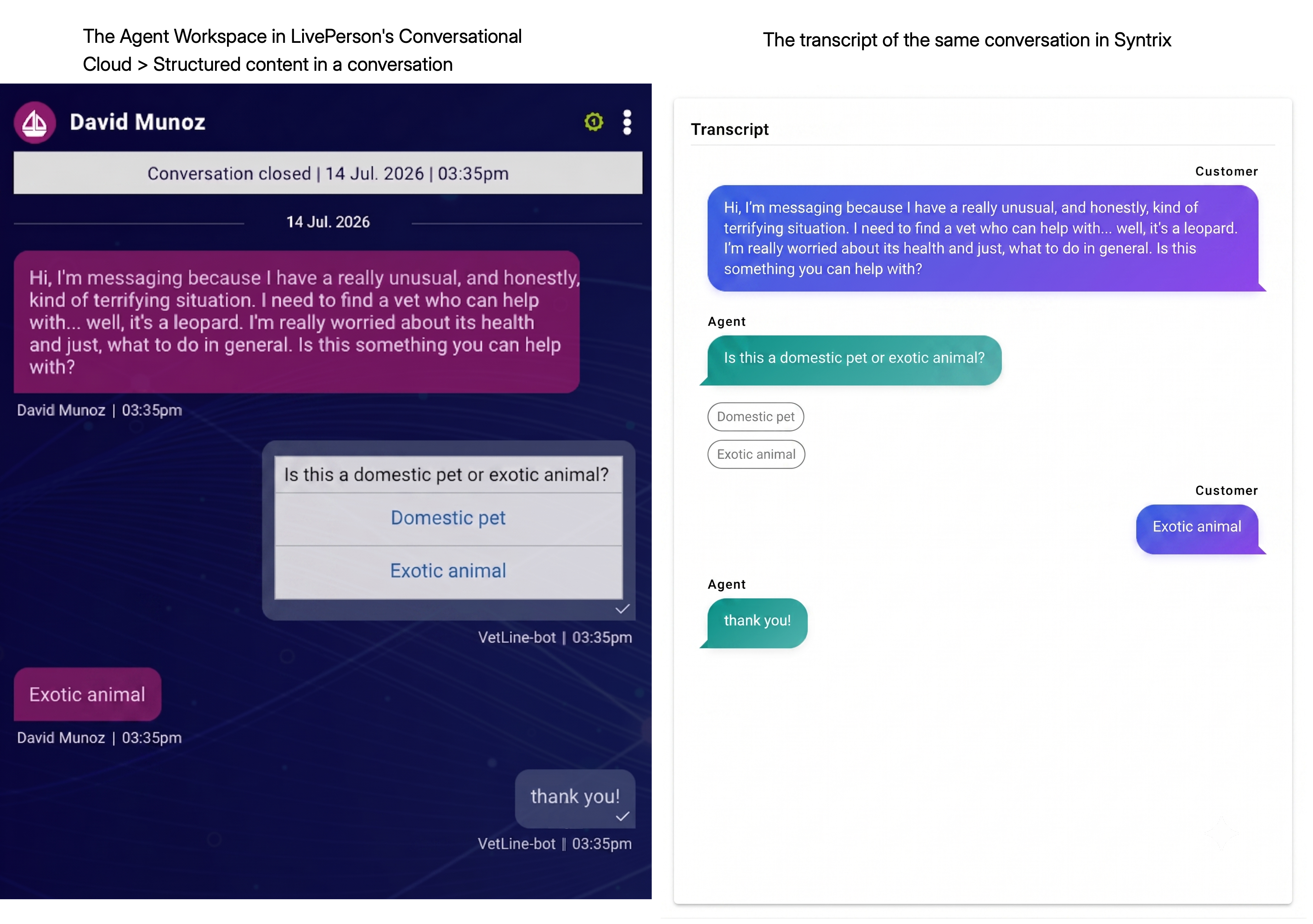
In the contact center UI, structured content renders in a rich, styled format.
However, what you see in Syntrix more closely resembles what the synthetic customer sees than what appears in a live contact center UI. In practice, this means:
- Structured menus render as a textualized version of a menu. It's a clean, readable list of options rather than rich, styled UI.
- There is no rich formatting support.
Transcript behavior
In a transcript, structured options appear as a plain text set of choices, not as interactive buttons or chips. This is consistent with the textualized rendering approach described above.