
AI agent validation - Rollout process
Ready to validate the performance of your AI agents? In this section, we describe the end-to-end rollout process that bridges the gap between Syntrix simulations and the Genesys Cloud agent workspace.
As per our best practices, verify beforehand that the AI agent can effectively handle its total conversation load, accounting for both live customer traffic (if the bot is already in use in Production) and the additional load that will be generated by simulations.
- In Genesys Cloud:
- Navigate to Architect > Digital Bot Flows, and open the "Syntrix_Bot_Connector" flow.
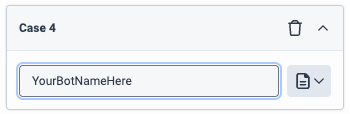
- In the Switch action block, add a new case, and provide the name of your bot. This will be the RoutingTarget value you can use in Syntrix to target your bot.
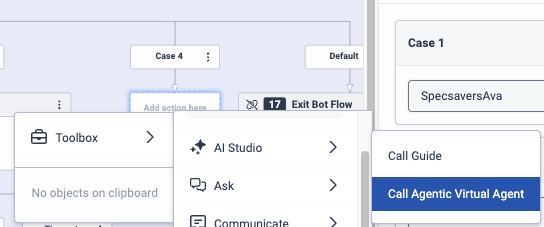
- In the new path under the Case block that corresponds to your new RoutingTarget value, add a Call Guide, Call Agentic Virtual Agent, or Transfer to Bot Flow action, as desired.
- In the call or transfer block, set any required input variables for your bot.
The simulated conversations handled by your AI agent will not be escalated to your production queues, even if your AI agent is handling production traffic. The conversations will always use the routing target defined in the Routing target field in the Syntrix scenario. If that routing target is an AI Agent, then any escalations will use the
Syntrix_Defaultqueue. - In Syntrix, create the simulation that you need to test your AI agents. You can use AI to assist you in the simulation creation process, or you can create the simulation manually. Then run the simulation.
- In the contact center solution, wait for a conversation between the synthetic customer and the AI agent to begin, and monitor its progress.
- In Syntrix, review the results: If the run is in progress, go to Simulation workshop > Running. Otherwise, go to Simulation workshop > Reports. Click the run. You can watch the results in real time as conversations are completed.
Agent training - Play the agent before rollout
Want to see how your scenarios hold up before trying them out with your live agents? This section covers the end-to-end testing process—a crucial step where you bridge the gap between Syntrix simulations and the contact center solution's agent workspace.
Instead of waiting for your agents to find a flaw in your setup, you’ll step into the agent’s role and interact with a synthetic customer. It’s the best way to ensure your scenarios and personas feel authentic and work well before rollout to your agents.
- In the contact center solution, create a "test" routing target (queue, etc.). Assign this "test" routing target to your own agent user. Also verify that your agent user is available to receive incoming conversations.
- In Syntrix, create the simulation that you need to test your live agents. You can use AI to assist you in the simulation creation process, or you can create the simulation manually. Then run the simulation.
- In the contact center solution, wait for an incoming conversation and accept it. Assume the role of the agent, and chat with the synthetic customer. Close the conversation when appropriate.
- In Syntrix, review the results (go to Simulation workshop > Reports), and click the simulation run.
When you're ready for your agents to participate in simulations, in the relevant scenarios, replace the "test" routing target with one that's in use in Production. Then begin your simulation runs as per your requirements.
Related topics
- Your iterative workflow in the simulation and training studio