
Overview
An interactive message to request the consumer's contact information. It can be used in case the phone number of a consumer is not known.
When an agent sends a contacting sharing message, the user can choose to share their WhatsApp phone number and username. When a user accepts such a request the conversation contacts SDE is updated and the phone number is shown next to the conversation transcript.
Example of WhatsApp Request Contact Information Message
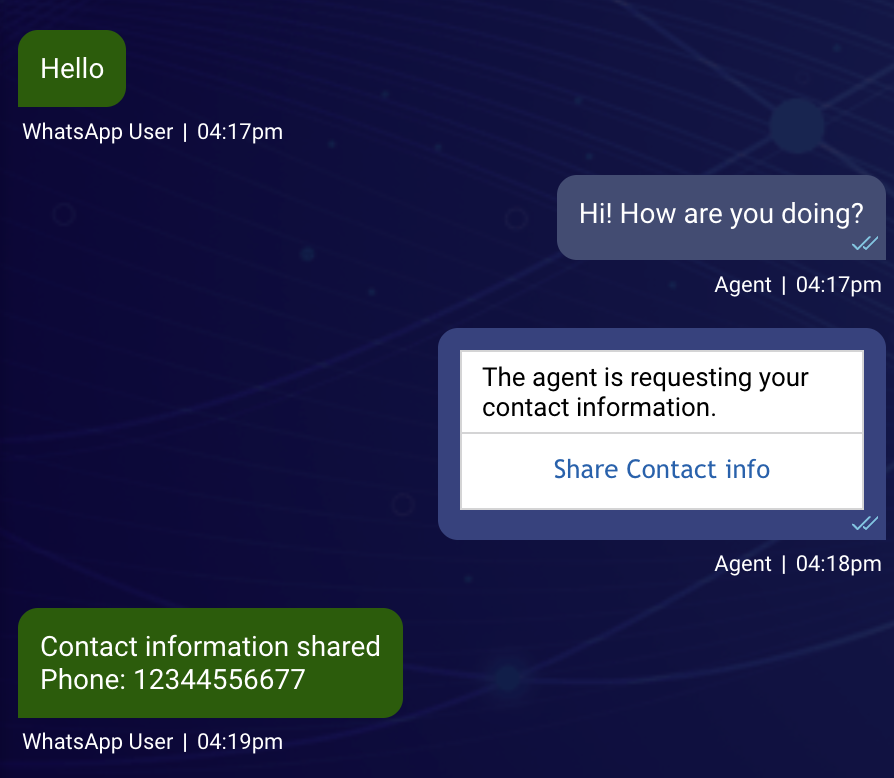
For an example of the user the message receives, check the official Meta documentation
Structure
The Request Contact information message consists of two parts
- Body
- Button
Note: We can control only the text in the Body of the message. We cannot control the text in the Button, because it is provided by WhatsApp.
Message Template
This section is describing the template which should be sent by bots or using a custom agent widget.
The message uses a Rich Message JSON template.
| Property Name | Description | Type | Required |
|---|---|---|---|
| type | Type of template. Must be "vertical" | Enum | Y |
| tag | Further specifies the template type. Must be "requestContactInfo" | String | Y |
| elements | Text element and button element | Array | Y |
Body element
| Property Name | Description | Type | Required |
|---|---|---|---|
| type | Type of element. Must be text | Enum | Y |
| text | Personalized message | String | Y |
| tag | Must be title | String | Y |
{
  "type": "text",
  "text": "The agent is requesting your contact information.",
  "tag": "title"
},
Button element
The button element does not have an impact on the message sent to WhatsApp. It is a placeholder for the Agent Workspace conversation view. The text of this button is defined by Meta and is not customizable.
Full Example
A full example for the Request Contact information interactive message looks like the following:
Example:
{
  "type": "vertical",
  "tag": "requestContactInfo",
  "elements": [
    {
      "type": "text",
      "text": "The agent is requesting your contact information.",
      "tag": "title"
    },
    {
      "type": "button",
      "title": "Share Contact info",
      "click": {
        "actions": [
          {
            "type": "custom",
            "data": []
          }
        ]
      }
    }
  ]
}
Related Sources
- Rich Messaging Introduction: https://developers.liveperson.com/getting-started-with-rich-messaging-introduction.html#basic-elements
- Facebook Meta Interactive Messaging: https://developers.facebook.com/docs/whatsapp/guides/interactive-messages